


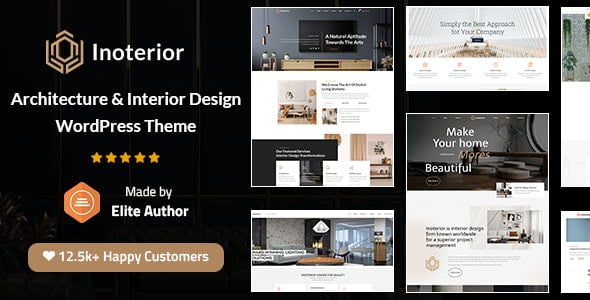
Inoterior – Architecture & Interior Designer WordPress Theme + RTL With Lifetime Update.
$12.90
| Features | Values |
|---|---|
| Version | v4.5 |
| Last Update | 9 April 2024 |
| Premium Features | Yes |
| Instant Installation Support | 24 Hrs. |
| Scanned By Virus Total | ✅ |
| Live Preview | 100% Working |
10
Items sold in last 3 minutes
278
People watching this product now!
Description
Introducing Inoterior, an iconic WordPress Theme crafted specifically for Architecture & Interior Designers. This marvelous theme caters to a wide range of purposes including architecture, interior design, construction, engineering, building styles, and more. Additionally, it can be utilized for various spaces such as homes, offices, schools, resorts, restaurants, shops, and more.
Inoterior Theme Features
- Google Fonts – 600+ for Logo, Body, Menu, Submenu, H1, H2, H3, H4, H5, H6, and Widget Titles
- Sidebar Manager – To the Left, Right, Fullwidth Page, and Post. Global, Page, and Post Specific.
- Custom Post Formats – For Standard, Gallery, Link, Quote, Video, Audio, and Blog Post
- Page Loader Animation (GIF) – 15+ GIFs and additionally, you can add your animation
- Widgets – Contact, Flickr, Recent Post, Category List, List Post
- Customization – Extensive Admin Interface
- GUI – Powerful Theme by Look & Feel
- Theme Customization Options – 15+
- Post Formats Supported in Blog – 10
- Search Result – Unique & Simple
- Translation File Editor – Poedit
- Sidebar – Custom & Variations
- Child Theme
- Use your Company or Brand Logo, Text, or Image
- Clean & Fresh Style
Inoterior Design Features
- Background Colors – Unlimited Colors via Color Picker for Header, Topbar& Footer, Bottom bar.
- Skin Color – Miscellaneous Skin Color via Color Picker
- Blog Layouts – Multiple Blog List, Standard Blog, Boxed Layout
- Design Quality – Responsive & Retina Ready
- Layouts – Unlimited Layout Possibilities
- Theme Demos – 6+ Ready Demos
- Header Style – 3+ Header Style
- UI/UX Design – Advanced
🌟100% Genuine Guarantee And Malware Free Code.
⚡Note: Please Avoid Nulled And GPL WordPress Themes.
Reviews (0)
Only logged in customers who have purchased this product may leave a review.
Installation Process


Certification




Reviews
There are no reviews yet.