


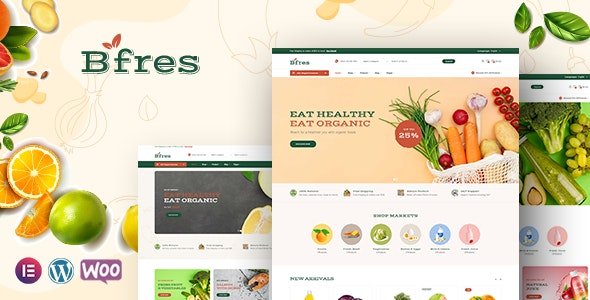
Bfres – Organic Food WooCommerce Theme With Lifetime Update.
$11.90
| Features | Values |
|---|---|
| Version | Latest |
| Last Update | 20 April 2024 |
| Premium Features | Yes |
| Instant Installation Support | 24 Hrs. |
| Scanned By Virus Total | ✅ |
| Live Preview | 100% Working |
13
Items sold in last 3 minutes
282
People watching this product now!
Description
Meet Bfres, the stunning and responsive Organic Food WooCommerce Theme. Perfect for natural food-related websites like grocery markets, organic stores, bakeries, and more. With an array of features and easy customization options via Theme Options, it’s designed to leave a positive impression on your customers. Enjoy seamless integration of Google fonts without any coding hassle.
All Features
- WordPress 6+ Ready
- WooCommerce 8+ Ready
- Elementor
- 03+ different homepage styles
- RTL Support
- Sticky menu
- 03+ different homepage styles
- Unlimited Different 2 Headers & 2 Footers (Footer Builder, building footer your way)
- Homepage sliders (Revolution Slider powered)
- Blog template – 04 styles (Grid, List)
- Unlimited Colors (Customize fonts, colors, backgrounds)
- Typography control (System fonts and Google fonts)
- HTML (Valid) & CSS3 animations
- Built with Bootstrap
- Responsive design (Mobile, Tablet and Desktops supported)
- SEO Optimized
- Translation Ready with a .pot file or WPML
- Megamenu, Multi level dropdown menu
- Demo content available(one click import)
- 07+ Product Detail layout
- 07+ Shop Layout
- Product Ajax: Add To Cart, Wishlist
- Product Compare
- Product Quickview
- Corlor Attributes Swatches
- Shop Grid View and List View supported
- Live search, Autocomplete search
- Social Sharing Features
- Easy To Customize
- Validate HTML5 Code
🌟100% Genuine Guarantee And Malware Free Code.
⚡Note: Please Avoid Nulled And GPL WordPress Themes.
Reviews (0)
Only logged in customers who have purchased this product may leave a review.
Installation Process


Certification



Reviews
There are no reviews yet.