


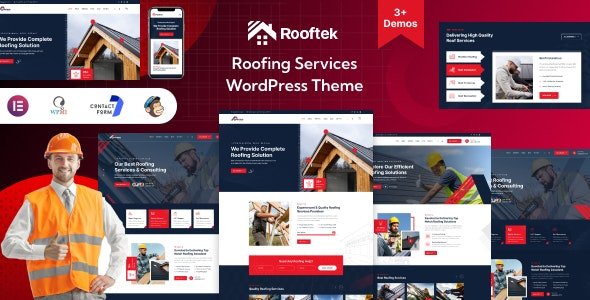
Rooftek – Roofing Services WordPress Theme With Lifetime Update.
$6.90
| Features | Values |
|---|---|
| Version | v1.0 |
| Last Update | 18 April 2024 |
| Premium Features | Yes |
| Instant Installation Support | 24 Hrs. |
| Scanned By Virus Total | ✅ |
| Live Preview | 100% Working |
19
Items sold in last 3 minutes
381
People watching this product now!
Description
Introducing Rooftek– Roofing Services WordPress Theme– the ultimate solution for roofing professionals. Crafted for precision and ease, our theme showcases your expertise with style. Elevate your brand with a sleek, responsive design that captivates visitors instantly.
Features Overview:
- 02 Awesome Demos
- Drag and drop page builder – Elementor Page Builder
- One click install demo.
- Built with elementor
- Responsive in Any Device
- Child theme included
- Fast, Lightweight & Powerful
- Smooth Transition Effects
- Contact Form7, Mailchimp Form
- Detailed Documentation & Dedicated support center
- Perfect clean code for your convenience
- Retina ready design with vector graphics
- Lifetime theme updates
- Cross-browser compatibility: Chrome, FireFox, Safari, Opera, IE11+
- Fast and perfect performance while viewing
- Easily Customizable
- Free updates of all plugins included
🌟100% Genuine Guarantee And Malware Free Code.
⚡Note: Please Avoid Nulled And GPL WordPress Themes.
Reviews (0)
Only logged in customers who have purchased this product may leave a review.
Installation Process


Certification








Reviews
There are no reviews yet.