


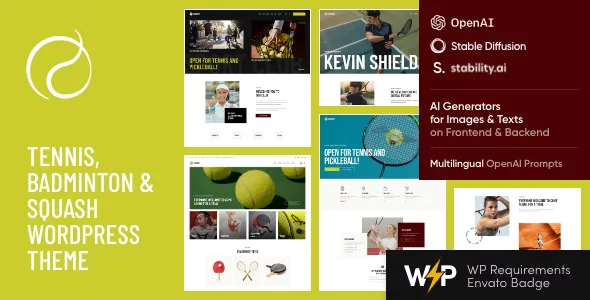
Racquet – Tennis, Badminton & Squash WordPress Theme with Lifetime Update.
$6.90
| Features | Values |
|---|---|
| Version | 1.12 |
| Last Update | 1 August 2024 |
| Premium Features | Yes |
| Instant Installation Support | 24 Hrs. |
| Scanned By Virus Total | ✅ |
| Live Preview | 100% Working |
18
Items sold in last 3 minutes
343
People watching this product now!
Description
This theme is ideal for tennis classes, schools, coaches, and tournaments. It suits both professional and amateur players.
Key Features
- Plugins: Includes the Booked Appointment plugin for booking courts and lessons, and the Sport Events Calendar for upcoming matches and events.
- Elementor & WooCommerce: Built with Elementor page builder and WooCommerce ready for creating a tennis equipment or sports apparel store.
- Design: Offers 7 homepage designs, diverse blog post layouts, portfolios, crypto payment support, custom widgets, and shortcodes.
🌟100% Genuine Guarantee And Malware Free Code.
⚡Note: Please Avoid Nulled And GPL WordPress Themes.
Reviews (0)
Only logged in customers who have purchased this product may leave a review.
Installation Process


Certification








Reviews
There are no reviews yet.