


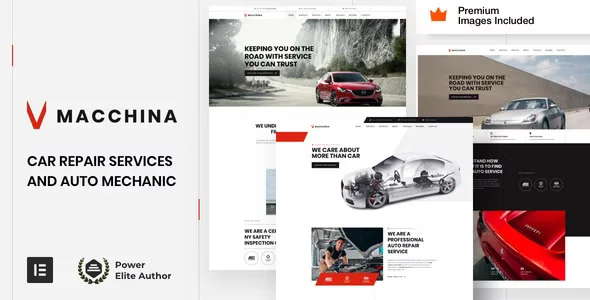
Macchina – Auto Repair WordPress Theme With Lifetime Update.
$6.90
| Features | Values |
|---|---|
| Version | Latest |
| Last Update | 12 July 2024 |
| Premium Features | Yes |
| Instant Installation Support | 24 Hrs. |
| Scanned By Virus Total | ✅ |
| Live Preview | 100% Working |
14
Items sold in last 3 minutes
315
People watching this product now!
Description
Macchina is a modern and user-friendly WordPress theme designed specifically for auto repair and car mechanic businesses, such as auto service shops, car mechanics, garages, or car service centers. It includes customizable pages and practical elements tailored for the automotive industry.
Key Features:
- Full Compatibility: Works seamlessly with Elementor and Elementor Pro (required for demo content import and setup).
- Free Images: Includes $240 worth of Premium Getty Images, which can be used without additional licenses.
- Enhanced Functionality: Extends Elementor widgets with additional styles and animations, ensuring stability and security.
- Customizable Options: Allows for the removal of theme code on a widget-by-widget basis.
- Easy Setup: Comes with an extensive setup guide and 23 HD WordPress video tutorials for beginners.
- Minimal Plugin Requirements: Requires only WordPress, Elementor, Elementor Pro, and WooCommerce—no extra plugins needed.
- Responsive Design: Offers full control over mobile and tablet views with customized breakpoints and RTL support.
- Advanced Features: Includes header and footer customization, dynamic content layouts, mega menus, forms, pop-ups, and a WooCommerce builder with wishlist, Ajax search, and gift card extensions.
- Efficient Support: Provides timely support with an average response time of 8 hours.
Macchina is ideal for creating a professional website for any auto-related business, offering a streamlined and powerful design experience.
🌟100% Genuine Guarantee And Malware Free Code.
⚡Note: Please Avoid Nulled And GPL WordPress Themes.
Reviews (0)
Only logged in customers who have purchased this product may leave a review.
Installation Process


Certification









Reviews
There are no reviews yet.