


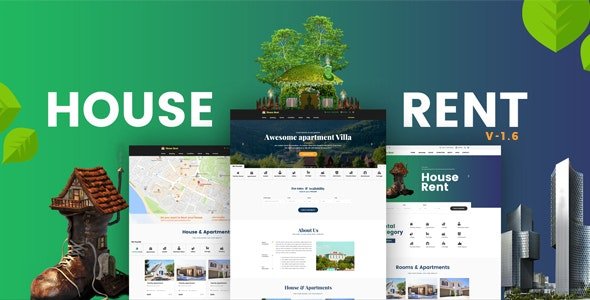
HouseRent – Multi Concept Rental WordPress Theme With Lifetime Update.
$9.90
| Features | Values |
|---|---|
| Version | v1.6 |
| Last Update | 2 July 2019 |
| Premium Features | Yes |
| Instant Installation Support | 24 Hrs. |
| Scanned By Virus Total | ✅ |
| Live Preview | 100% Working |
HouseRent is a clean and elegant WordPress theme designed for House, Office, Shop Rent, Cottage, Apartment, and Real-estate websites. Its simplicity and focus on content make it suitable for various rental services. With user-friendly features and comprehensive documentation, HouseRent makes website setup effortless.
NSTALLATION ERROR FIX
A PHP error come when installing theme. It’s fix on version 1.4. Now theme is error free
DYNAMIC CONTACT FORM FOR RENTAL SINGLE PAGE
Added Rental Booking form with dynamic option where you can control your form field or if you want you can added contact form 7 shortcode. For that you can control every staff of rental booking contact form field.
RENTAL SINGLE POST PAGE BUILDER SUPPORT
Now Rental single page support page builder. So you can more control about rental single page with drag and drop page builder. And we added the the meta field with shortcode. If you want then you can use this as well.
SPEED OPTIMIZATION
Houserent Theme page speed is more increased. We work some speed optimization issue. We hope you are enjoy more page speed now.
Why you Purchased Houserent WordPress Theme?
HouseRent is clean content focus House, Office, Shop Rent, Cottage, Apartment, Real-state WordPress Theme. It is simple and elegant. HouseRent is suitable for any kind of House, Office, Shop Rent, Cottage, Apartment, Real-estate website and various other services that you do use the web. It’s features make this theme very easy. All required information’s are provided in documentation.
🌟100% Genuine Guarantee And Malware Free Code.
⚡Note: Please Avoid Nulled And GPL WordPress Themes.
Only logged in customers who have purchased this product may leave a review.










Reviews
There are no reviews yet.