


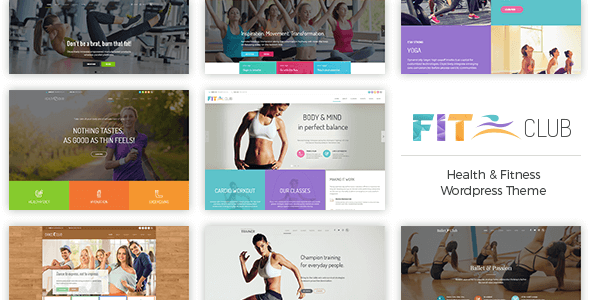
Fitness Club – Health & Gym WordPress Theme With Lifetime Update.
$12.90
| Features | Values |
|---|---|
| Version | v1.4.2 |
| Last Update | 26 October 2023 |
| Premium Features | Yes |
| Instant Installation Support | 24 Hrs. |
| Scanned By Virus Total | ✅ |
| Live Preview | 100% Working |
13
Items sold in last 3 minutes
91
People watching this product now!
Description
Fitness Club is a WordPress theme exclusively built for fitness, yoga, ballet, dance, gym, health clubs and personal trainer websites. It is fully responsive, retina ready and easy to customize.
Feature List
- Responsive and retina ready design
- Full static page support with shortcodes
- Shortcodes tailored to showcase works of fitness, yoga, ballet, dance, gym, health clubs and personal trainer websites
- Business oriented custom icon sets
- Various header layouts including sticky header
- Full width and boxed pages and headers
- Lightning fast page builder
- Portfolio shortcode for static pages and blog posts
- Full width and boxed blog & portfolio tiles layout
- Left and right sidebar option
- Theme options powered by WordPress customizer
- Translation ready
- Child theme ready
- WooCommerce support
- WPML support
🌟100% Genuine Guarantee And Malware Free Code.
⚡Note: Please Avoid Nulled And GPL WordPress Themes.
Reviews (0)
Only logged in customers who have purchased this product may leave a review.
Installation Process


Certification









Reviews
There are no reviews yet.