


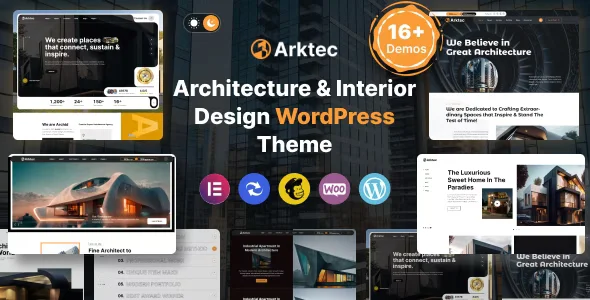
Arktec – Architecture WordPress Theme With Lifetime Update.
$6.90
| Features | Values |
|---|---|
| Version | 6.4 |
| Last Update | 25 February 2024 |
| Premium Features | Yes |
| Instant Installation Support | 24 Hrs. |
| Scanned By Virus Total | ✅ |
| Live Preview | 100% Working |
Header & Footer Builder Supported
Choose and customize headers and footers to fit your needs using the Elementor page builder.
Drag and Drop Page – Elementor
Customize quickly and easily with Arktec’s intuitive Elementor interface.
One-Click Installation
Install Arktec quickly with our powerful one-click installer.
Powerful Framework
Built on the robust Codestar framework for extensive theme options.
Advanced Theme Options
Customize every aspect of your site without coding.
Advanced Page/Post Options
Override global settings for unique pages or posts.
Unlimited Color Options
Customize fonts and colors to match your brand.
WooCommerce Designer Pro
Create online designs for business cards, posters, T-shirts, and more.
Mailchimp Integration
Sync newsletter subscriptions with your Mailchimp account.
Compatible with Contact Form 7
Easily create custom contact forms.
Detailed Documentation Included
Access extensive documentation and video guides for easy customization
🌟100% Genuine Guarantee And Malware Free Code.
⚡Note: Please Avoid Nulled And GPL WordPress Themes.
Only logged in customers who have purchased this product may leave a review.









Reviews
There are no reviews yet.