


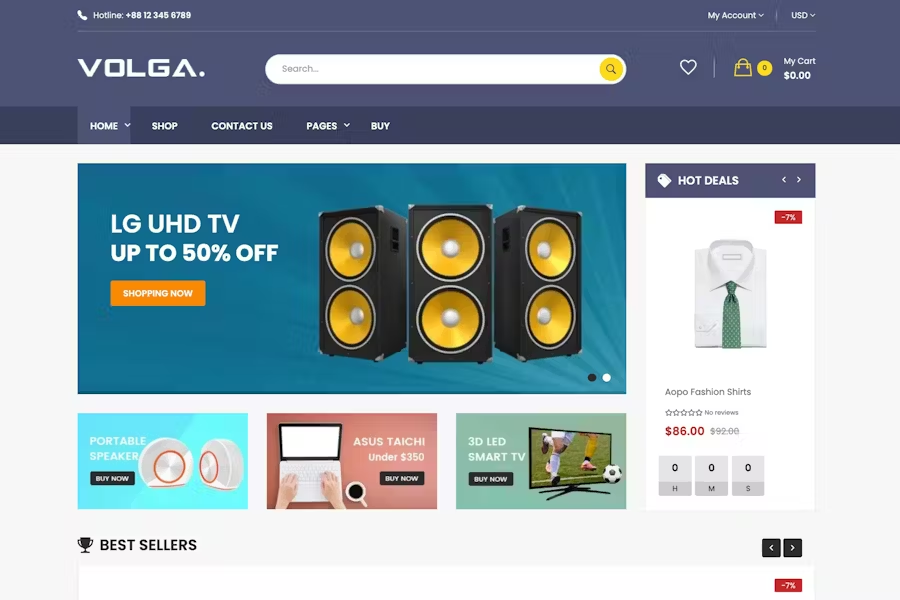
Volga – MegaShop Technology Shopify Theme With Lifetime Update.
$2.90
| Features | Values |
|---|---|
| Latest Update | Yes |
| Premium Item | Yes |
| Instant Installation Support | 24 Hrs. |
| Scanned By Virus Total | ✅ |
| Live Preview | 100% Working |
Looking for a great ecommerce store to sell your items is your necessity now? Don’t hesitate, Volga Mega Store Technology Shopify theme is not a bad choice for you!
Volga is a Technology Shopify theme, it’s easy to install and customize. It has 9 homepages with various colors, useful modules and excellent design. In order to accommodate multiple genres, Volga uses two types of menu: vertical and horizontal menu. With vertical menu, you can show many categories without feeling cluttered with thumbnails. And with horizontal menu, you can show many external and internal links. Header is designed to be airy and compact with logo, form search category, wishlist icon, topcart along with contact phone, welcome text. The countdown module features a discounted counter with a countdown to end date. Product Tabs module show new, onsale, bestseller, most viewed, deals products of each category in each tab. Using image in each module Product Tabs, customers can see featured image of each category. Blog module permits show image and introduction text of posts which contains introductions about your store, latest promotions, new products. Featured categories are displayed beautifully with small image. Brand Logo Slider show nice logo as slider via Banner module.
🌟100% Genuine Guarantee And Malware Free Code.
⚡Note: Please Avoid Nulled And GPL Shopify Themes.
Only logged in customers who have purchased this product may leave a review.











Reviews
There are no reviews yet.