


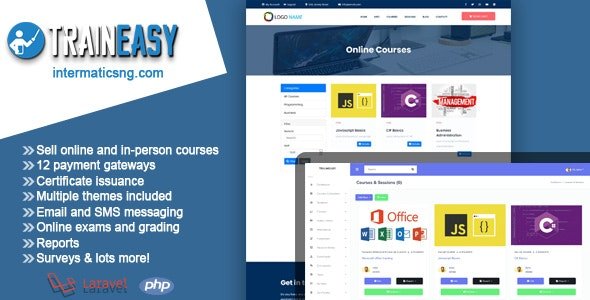
TrainEasy LMS – Training & Learning Management System With Lifetime Update.
$14.90
| Features | Values |
|---|---|
| Version | Latest |
| Last Update | 30 April 2024 |
| Premium Features | Yes |
| Instant Installation Support | 24 Hrs. |
| Scanned By Virus Total | ✅ |
| Live Preview | 100% Working |
If you organize training programs, whether online or in physical locations, TrainEasy is the ideal software solution for managing your entire training program efficiently. It offers both student-facing frontend and admin backend functionalities, allowing seamless management of online and offline training sessions. With features like session and course management, class organization, support for multiple payment gateways and currencies, attendance tracking, student management, online assessments, content management through blogging, and much more, TrainEasy streamlines your training operations effectively.
Complete Training & Learning Management System
Do you organize training programs online or at physical locations? If yes, then TrainEasy is the perfect software for running and managing your entire training program!
- Student Frontend & Admin Backend
- Online Training
- Manage & Schedule offline training
- Session & Course Management
- Class Management
- Supports Multiple Payment Gateways
- Multi-currency support
- Attendance Management
- Student Management
- Online Tests/Assessments
- Zoom Integration
- Website builder with multiple free themes
- Video/Audio file management with S3 support
- Blogging & Content Management
- And Lots More!
🌟100% Genuine Guarantee And Malware Free Code.
⚡Note: Please Avoid Nulled And GPL PHP Scripts.
Only logged in customers who have purchased this product may leave a review.










Reviews
There are no reviews yet.