


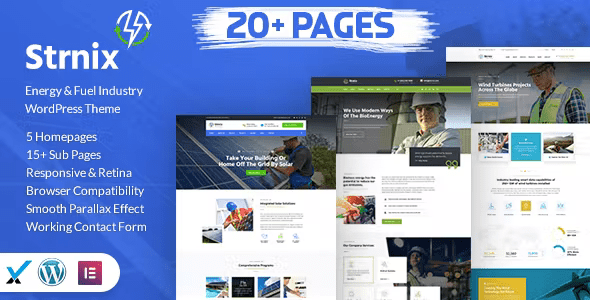
Strnix – Solar and Green Energy WordPress Theme With Lifetime Update.
$8.90
| Features | Values |
|---|---|
| Version | v2.1 |
| Last Update | 20 February 2024 |
| Premium Features | Yes |
| Instant Installation Support | 24 Hrs. |
| Scanned By Virus Total | ✅ |
| Live Preview | 100% Working |
10
Items sold in last 3 minutes
236
People watching this product now!
Description
Strnix WordPress Theme is an ideal choice to promote environmental projects or green products. It’s compatible with modern mobile devices and features a well-designed blog.
Full Features List
- 100% Fluid Responsive Fits any device perfectly
- Tested on real devices
- Flexible Layout
- Unlimited Sidebars
- Flat, modern and clean design.
- Retina Optimised
- Google Map with multiple location
- Social Links
- Bottom Footer Widgets
- Clean & Commented Code
- Advanced Typography
- Custom Font Support
- Unlimited Page Included
- Pixel Perfect Design
- Built on Bootstrap 3
- Valid HTML5 & CSS3 Files
- Unlimited Blog Pages
- Cross Browser Compatibility
- Detailed Oriented Listing
- Parallax effect
- Awesome Unique Look
- Unique effects and functionality
- Google font
- Quick, Dedicated & Professional Support
- Well Documented & More
🌟100% Genuine Guarantee And Malware Free Code.
⚡Note: Please Avoid Nulled And GPL WordPress Themes.
Reviews (0)
Only logged in customers who have purchased this product may leave a review.
Installation Process


Certification





Reviews
There are no reviews yet.