


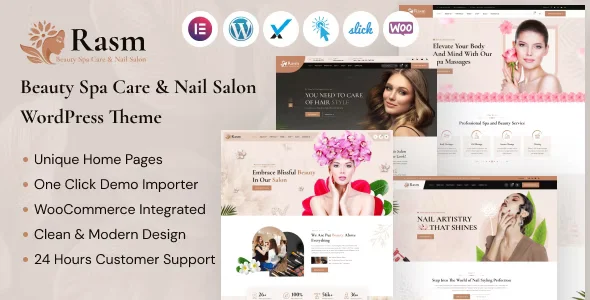
Rasm – Beauty Spa Care & Nail Salon WordPress Theme With Lifetime Update.
$6.90
| Features | Values |
|---|---|
| Version | 1.2 |
| Last Update | 31 july 2024 |
| Premium Features | Yes |
| Instant Installation Support | 24 Hrs. |
| Scanned By Virus Total | ✅ |
| Live Preview | 100% Working |
12
Items sold in last 3 minutes
363
People watching this product now!
Description
Rasm is a premium WordPress theme designed for beauty spas, nail salons, and cosmetic stores. Ideal for selling beauty products like skincare, makeup, and hair care, it offers a fully responsive and mobile-friendly design.
Key Features:
- Easy Customization: Built with Elementor for drag-and-drop editing, no coding required.
- WooCommerce Support: Seamless integration for eCommerce.
- Pre-Made Demos: Variety of demo home pages for quick setup.
- Cross-Browser Compatibility: Works with Chrome, Opera, Firefox, Safari, and IE.
- Robust Framework: Uses Underscores framework and latest Bootstrap version for smooth operation.
- SEO & GDPR Compliance: Compatible with Yoast SEO and GDPR compliant.
- Plugins Included: MailChimp, Contact Form 7, Slick Slider, Redux Framework, WPML, and more.
Rasm is built with clean HTML5 and CSS3, ensuring excellent performance and W3C validation. Create a standout beauty shop or spa website with ease using Rasm. Check it out now!
🌟100% Genuine Guarantee And Malware Free Code.
⚡Note: Please Avoid Nulled And GPL WordPress Themes.
Reviews (0)
Only logged in customers who have purchased this product may leave a review.
Installation Process


Certification







Reviews
There are no reviews yet.