


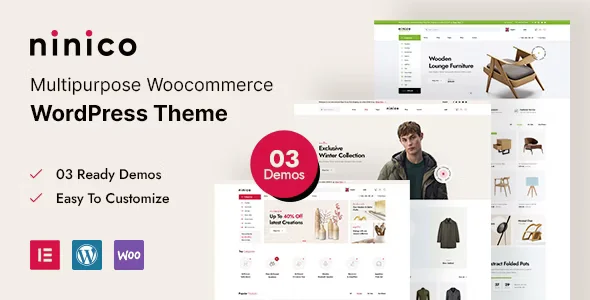
Ninico – Minimal WooCommerce WordPress Theme With Lifetime Update.
$6.90
| Features | Values |
|---|---|
| Version | 1.0.3 |
| Last Update | 6 December 2023 |
| Premium Features | Yes |
| Instant Installation Support | 24 Hrs. |
| Scanned By Virus Total | ✅ |
| Live Preview | 100% Working |
15
Items sold in last 3 minutes
200
People watching this product now!
Description
Ninico is a minimal WooCommerce WordPress theme with a clean, bold design, perfect for personal or larger-scale stores. It combines trendy lifestyle aesthetics with pure elegance, presenting content in a straightforward, minimal way.
- Built with Modern Technologies: Utilizes Bootstrap 5, Elementor, HTML5, CSS3, and jQuery, making it a powerful and user-friendly multi-purpose theme.
- Design and Customization: Features 3 different homepage designs and 3+ header styles, offering plenty of customization options. Its trendy design includes smooth transitions and animations.
- Responsive and Cross-Browser Compatible: Tested on all devices and browsers like Firefox, Chrome, Internet Explorer, and Safari, ensuring flawless performance.
- High Customizability: Looks great on tablets and mobile devices, following best web development practices. You can create a fantastic website layout using Bootstrap or a 1170px grid.
Ninico is ideal for maximizing your website’s appeal and engaging visitors effectively.
Reviews (0)
Only logged in customers who have purchased this product may leave a review.
Installation Process


Certification








Reviews
There are no reviews yet.