


Internet Provider Broadband TV WordPress Theme | Internet Service – Subnet With Lifetime Update.
$8.90
| Features | Values |
|---|---|
| Version | Latest |
| Last Update | 30 July 2023 |
| Premium Features | Yes |
| Instant Installation Support | 24 Hrs. |
| Scanned By Virus Total | ✅ |
| Live Preview | 100% Working |
20
Items sold in last 3 minutes
118
People watching this product now!
Description
Subnet, a sleek WordPress theme, is ideal for Internet providers, broadband TV services, and related businesses. Perfect for telecom agencies, corporate phone lines, computer networks, and cable television shops, it’s also great for mobile operators and online movie networks. Fully responsive, it looks fantastic on all devices and screens.
Full Features List
- Elementor Page builder
- Based on Bootstrap 5.x
- 100% Responsive
- Niche Specific WordPress Theme
- WordPress Latest Version Compatibility
- One-click Demo import
- No coding knowledge required
- 2+ Home Pages
- 30+ Custom Elementor Widget
- 2+ Header Variation
- 1 Footer Variation
- SEO Optimized
- Custom Widgets
- Support WP Customizer
- Header and footer Setting
- Cross Browser Support
- Professional Support
- Regular Updates
- Google Fonts
- Image Background
- Easy to customize
- Flexible and Multi-purpose
- Google Fonts
- Valid HTML5 / CSS3
- HTML & CSS & JS files are included
- Amazing 5 stars support
- Detailed documentation
🌟100% Genuine Guarantee And Malware Free Code.
⚡Note: Please Avoid Nulled And GPL WordPress Themes.c
Reviews (0)
Only logged in customers who have purchased this product may leave a review.
Installation Process
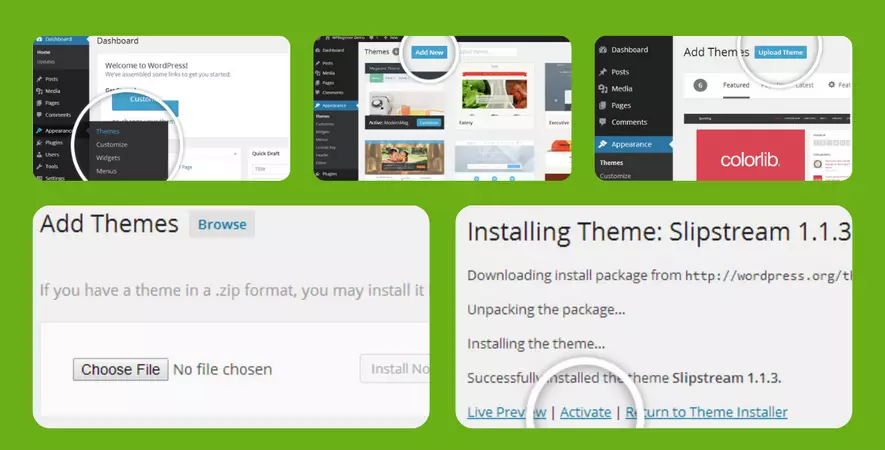
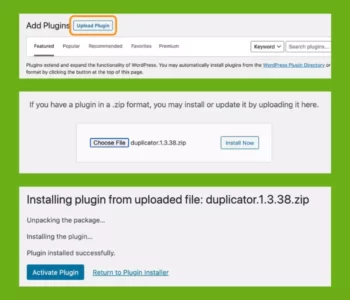
Certification






Reviews
There are no reviews yet.