Hobi – Personal Portfolio WordPress Theme With Lifetime Update.

$6.90

Features Values
Version 1.1.9
Last Update 9  December  2023
Premium Features Yes
Instant Installation Support 24 Hrs.
Scanned By Virus Total
Live Preview 100% Working
20 Items sold in last 3 minutes
339 People watching this product now!
SKU: 53464 Category:
Description

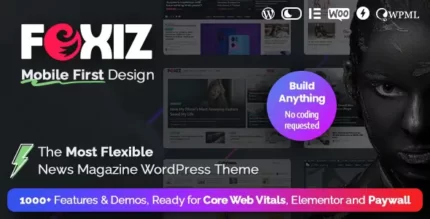
Hobi is a high-quality, creative WordPress theme designed for personal portfolios with a unique style and clean code. Perfect for minimal portfolios, agencies, and freelancers, it’s built with Bootstrap 4, WPBakery, HTML5, and CSS3, ensuring full responsiveness across all devices and browsers.

Highly customizable, Hobi offers seamless performance on tablets and mobile devices. It follows web development best practices, allowing you to create stunning layouts based on Bootstrap or a 1170px grid. If you want to maximize your website’s impact, Hobi is the ideal choice.

🌟100% Genuine Guarantee And Malware Free Code.

⚡Note: Please Avoid Nulled And GPL WordPress Themes.

Reviews (0)

Reviews

There are no reviews yet.

Only logged in customers who have purchased this product may leave a review.
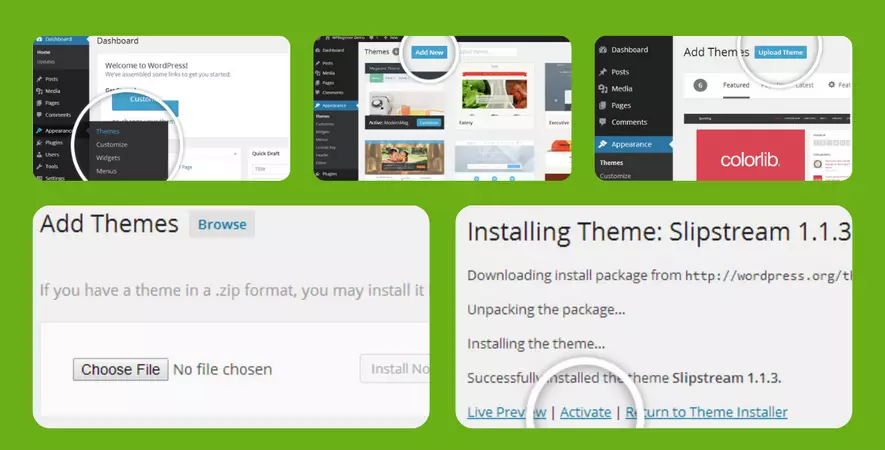
Installation Process

WordPress Theme Installation

  1. Download the theme zip file after purchase from CodeCountry.net
  2. Then, log in to your WordPress account and go to Appearance in the menu on the left of the dashboard and select Themes.
  3. On the themes page, select Add New at the top of the page.

  4. After clicking on the Add New button, select the Upload Theme button.

  5. After selecting Upload Theme, click Choose File. Select the theme .zip folder you've downloaded, then click Install Now.
  6. After clicking Installa message will appear that the theme installation was successful. Click Activate to make the theme live on your website.

WordPress Plugin Installation

  1. Download the plugin zip file after purchase from CodeCountry.net
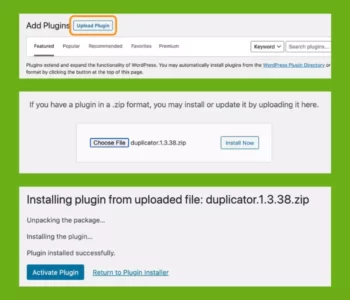
  2. From your WordPress dashboard, choose Plugins > Add New
  3. Click Upload Plugin at the top of the page.

  4. Click Choose File, locate the plugin .zip file, then click Install Now.

  5. After the installation is complete, click Activate Plugin.
Certification

This certificate represents that the codecountry.net is an authorized agency of WordPress themes and plugins.