



Flowto – Startup & SaaS WordPress Theme With Lifetime Update.
$8.90
| Features | Values |
|---|---|
| Version | Latest |
| Last Update | 26 April 2024 |
| Premium Features | Yes |
| Instant Installation Support | 24 Hrs. |
| Scanned By Virus Total | ✅ |
| Live Preview | 100% Working |
11
Items sold in last 3 minutes
288
People watching this product now!
Description
Flowto: A WordPress theme perfect for Sass startups, mobile app showcases, software, web applications, SEO agencies, and corporate websites. Showcase your business creatively with clean, modern, and trendy design. Users will enjoy a unique user experience. Built to impress, you’ll say “Wow this is amazing” after purchase.
Full Features List
- 100% Fluid Responsive – Fits any device perfectly
- Tested on real devices
- Flexible Layout
- Use our demo layout or create your own visually different experience using page Flowto and feature-rich backend.
- Blog Sidebars
- Retina Optimized
- Advanced Admin Panel
- Demo Import, Content and Sliders
- Social Links
- Clean & Commented Code
- Advanced Typography
- Google Fonts – 600+ Font families available
- Custom Page Templates
- Pixel Perfect Design
- Quick & Easy Installation & Setup
- Localizable with .pot translation files
- Unlimited Pages
- Custom Widgets and smart admin panel for customizations
- Customizable Contact Forms with Contact Form 7 support
- Cross Browser Compatibility
- Well Documented & More….
🌟100% Genuine Guarantee And Malware Free Code.
⚡Note: Please Avoid Nulled And GPL WordPress Themes.
Reviews (0)
Only logged in customers who have purchased this product may leave a review.
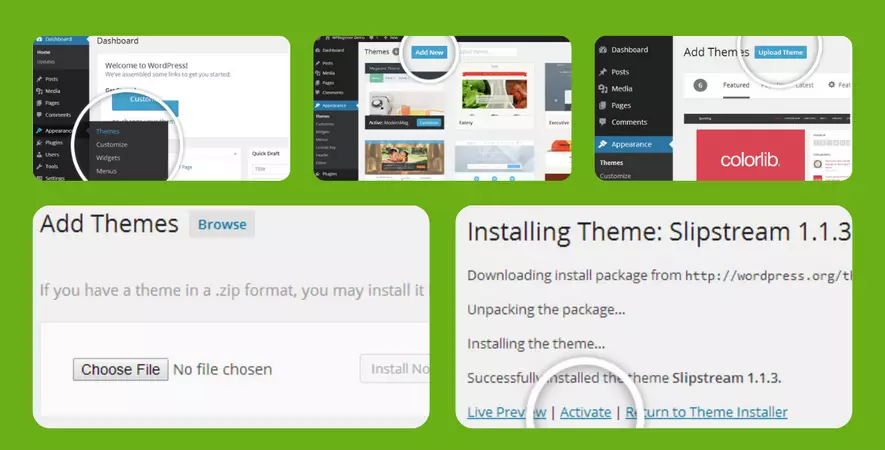
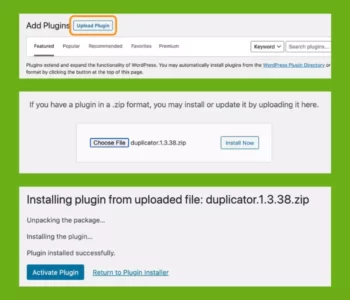
Installation Process
Certification










Reviews
There are no reviews yet.