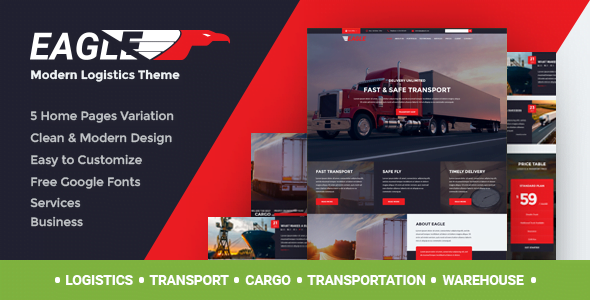
Eagle – Logistics & Transportation WordPress Theme With Lifetime Update.
$6.90
| Features | Values |
|---|---|
| Version | Latest |
| Last Update | 23 July 2024 |
| Premium Features | Yes |
| Instant Installation Support | 24 Hrs. |
| Scanned By Virus Total | ✅ |
| Live Preview | 100% Working |
Create an incredible Logistics/Warehouse/Transportation website with our versatile theme. Permanently updated, it offers reliable support and outstanding features:
- Redux Framework Theme-Options Panel
- Settings: General, Styling, Header, Footer, Contact, Blog, Shop, 404 Page, Social Media, SEO (Google Analytics built-in)
- MailChimp Newsletter
- Demo Data Importer
- Services: List and Single Page
- Members: List and Types
- Multiple header and footer variants
- One-click importer
- 600+ Google Fonts
- Font Icons
- Well-documented
- PHP-Ajax Contact Form
- Custom Widgets
- Multiple Colors & Skins
- Eye-catching CSS Animations
- Compatible with Contact Form 7
- Permanent updates
- Excellent Typography
- Optimized for high speed
- Fast and easy to use
Impress your clients and colleagues and boost your business with this all-in-one theme. Try it now and transform your web design experience.
Please note: Refunds are not provided for mistaken purchases due to the nature of digital goods. Refunds are only available for broken products, which our theme is not, as it has passed Envato review.
If you like Eagle Theme, please rate it 5 stars. Thank you!
🌟100% Genuine Guarantee And Malware Free Code.
⚡Note: Please Avoid Nulled And GPL WordPress Themes.
Only logged in customers who have purchased this product may leave a review.
WordPress Theme Installation
- Download the theme zip file after purchase from CodeCountry.net
- Then, log in to your WordPress account and go to Appearance in the menu on the left of the dashboard and select Themes.
On the themes page, select Add New at the top of the page.
After clicking on the Add New button, select the Upload Theme button.
- After selecting Upload Theme, click Choose File. Select the theme .zip folder you've downloaded, then click Install Now.
- After clicking Install, a message will appear that the theme installation was successful. Click Activate to make the theme live on your website.
WordPress Plugin Installation
- Download the plugin zip file after purchase from CodeCountry.net
- From your WordPress dashboard, choose Plugins > Add New
Click Upload Plugin at the top of the page.
Click Choose File, locate the plugin .zip file, then click Install Now.
- After the installation is complete, click Activate Plugin.
This certificate represents that the codecountry.net is an authorized agency of WordPress themes and plugins.

Reviews
There are no reviews yet.