


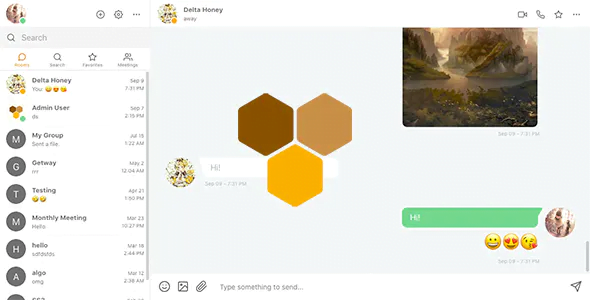
Clover – Real-Time Messaging, Audio & Video Conferencing Web App – Node.js, React, WebRTC, Socket.IO With Lifetime Updates.
$24.90
| Features | Values |
|---|---|
| Version | v2.9.0 |
| Last Update | 14 February 2024 |
| Premium Features | Yes |
| Instant Installation Support | 24 Hrs. |
| Scanned By Virus Total | ✅ |
| Live Preview | 100% Working |
Announcement:
Clover, an instant messaging & conferencing web app with audio/video capabilities, now offers beta and stable v2 source code downloads. Additional installation instructions for v3 beta are available. Please refer to the v3 README file for details.
Features in v3 beta:
– Redesigned UI
– Files stored within MongoDB
– Password reset and welcome email
– Profile editing and password change
– Access point for finding people, creating groups, scheduling meetings
– Improved mobile UI and resource management
– Enhanced speed and scalability
– New groups system
– Dockerization
– Full installation script with Docker and Docker Compose
– English (default) and Italian translations
– Admin panel for user management
– Calendar/meeting scheduler
Under development:
– New meetings and notifications systems
– Migration script from v2 to v3
🌟100% Genuine Guarantee And Malware Free Code.
⚡Note: Please Avoid Nulled And GPL PHP Scripts.
Only logged in customers who have purchased this product may leave a review.











Reviews
There are no reviews yet.