


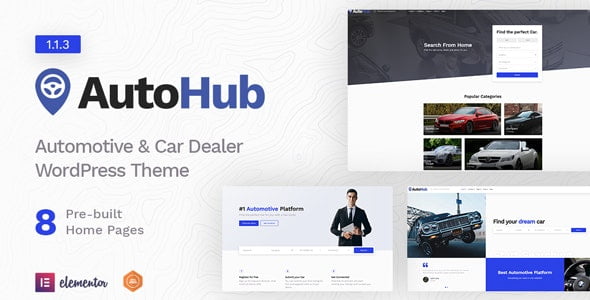
Autohub – Automotive & Car Dealer Theme With Lifetime Update.
$14.90
| Features | Values |
|---|---|
| Version | v1.1.8 |
| Last Update | 12 May 2024 |
| Premium Features | Yes |
| Instant Installation Support | 24 Hrs. |
| Scanned By Virus Total | ✅ |
| Live Preview | 100% Working |
10
Items sold in last 3 minutes
188
People watching this product now!
Description
Autohub is a professional WordPress Directory Theme designed for car dealers and renters. It offers comprehensive automotive solutions with listing submissions, beautiful layouts, advanced stats, premium dashboard, user notifications, and advanced search options—all built-in, no extra plugins needed.
Core Features:
- Listing Submissions
- Earn Money with listing packages – Create different listing submission packages for your users to be able to submit a listing.
- Earn Money with listing promotions – Create different listing promotion packages for your users to promote their listing for a set price.
- Premium Dashboard – All listing-related actions can be handled from the user dashboard.
- Dashboard Charts – Visits will be listed in the dashboard to keep track of how your listings are performing.
- User Notifications – Your user will receive notifications about every important event.
- User Approval – With the custom login & register system you can approve or deny new registered users before they can take any action.
- User Following – You can follow users via their profile and have them listed in your dashboard.
- Advanced Search Fields
- Field Editor for Listing Submission Form
Extra Features:
- Built with Elementor
- 8 Unique Home Pages
- Extended Custom Elements for Elementor
- Advanced Demo Importer
- Google Map, OSM & Mapbox map Support
- 4 different listing layouts
- Fully Responsive
- Full WooCommerce Compatibility
- Different Testimonial Styles
- Contact Form 7 support
- Full translatable (.pot file included)
- SEO Ready
- Advanced Typography Control
- Google fonts (800+) support
- Child Theme Included
- W3C Valid HTML
- Reliable Support
- Well Documented
- More features coming soon!
🌟100% Genuine Guarantee And Malware Free Code.
⚡Note: Please Avoid Nulled And GPL WordPress Themes.
Reviews (0)
Only logged in customers who have purchased this product may leave a review.
Installation Process


Certification






Reviews
There are no reviews yet.