

![[MacOS] Responsive PHP Admin Panel Generator With Permission Management, Image Upload & Activity Log](https://codecountry.net/wp-content/uploads/2024/05/macos_responsive_php_admin_panel_generator_with_permission_management_image_upload_activity_log_30336386-60x60.jpg)
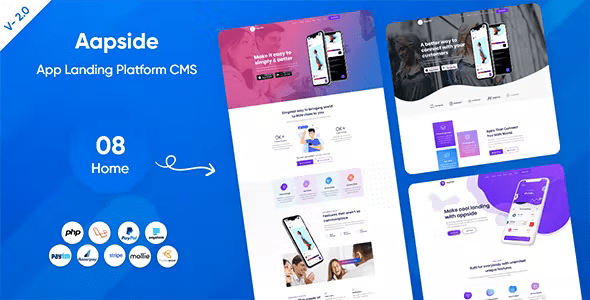
Appside – App Landing Platform With Lifetime Update.
$16.90
| Features | Values |
|---|---|
| Version | v 2.0.1 |
| Last Update | 18 September 2022 |
| Premium Features | Yes |
| Instant Installation Support | 24 Hrs. |
| Scanned By Virus Total | ✅ |
| Live Preview | 100% Working |
11
Items sold in last 3 minutes
335
People watching this product now!
Description
Appsdie App Landing Page is the ideal platform to showcase your app. With Aapside, you can effortlessly present your modern business. It’s highly customizable, well-documented, and includes a child theme. Plus, it’s compatible with desktops, laptops, mobile devices, and all major browsers.
Features
- Unique Design
- 08 Home Variant
- Powerful Admin Dashboard
- Muti language support
- User Role Permission System (Super Admin Can Assign Role or Can Add New Admin)
- Home Variant
- navbar Settings
- Home Page Settings
- Counterup Area
- Intro Video Area
- Screenshot Area
- Testimonial Area
- Pricing Plan Area
- Team Area
- Contact Area
- Header Area
- Top Bar Settings
- Key Features
- Awesome Features
- Full Width Features
- Screenshot
- Price Plan
- Team Members
- Testimonial
- Blog Page
- Counterup
- Call To Action
- Footer Area
- About Widget
- Useful Links
- Recent Post
- Important Links
- Blo
- All Blogs
- Blog Category
- New Post
- General Settings
- Site Identity
- Basic Settings
- SEO Settings
- Third Party Scripts Settings ( Like Google Analytics , Disqus, Twak.to )
- Email Template
- Language Settings
- Fully Responsive
- Well Documented
- Easy to customise
- Friendly Support
🌟100% Genuine Guarantee And Malware Free Code.
⚡Note: Please Avoid Nulled And GPL PHP Scripts.
Reviews (0)
Only logged in customers who have purchased this product may leave a review.
Installation Process


Certification









Reviews
There are no reviews yet.