


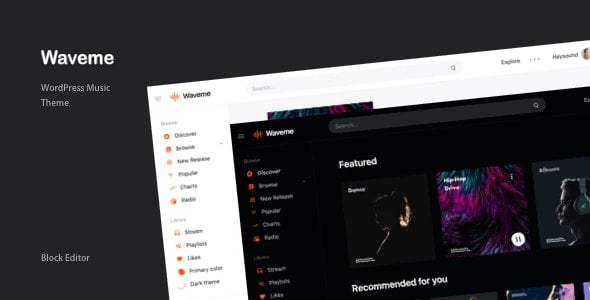
Waveme – Music Platform WordPress Theme With Lifetime Update.
$12.90
| Features | Values |
|---|---|
| Version | Latest |
| Last Update | 31 March 2024 |
| Premium Features | Yes |
| Instant Installation Support | 24 Hrs. |
| Scanned By Virus Total | ✅ |
| Live Preview | 100% Working |
Introducing Waveme, a feature-rich music WordPress theme designed to create professional music web applications. Ideal for music platforms, audio publishers, and sophisticated DJ applications, Waveme also serves as an audio social network for music enthusiasts.
With a block editor page builder and Loop Block plugin, you can easily build various loop contents, including posts, pages, taxonomies, and users. The Play Block plugin allows you to create single, playlist, and album music types on any posts, simplifying the process of audio, radio, and music entry creation.
Waveme offers front-end submission capabilities, allowing users to upload their stations with ease. Users can also manage their playlists, likes, and followers/following directly from their user library. Additionally, the theme provides both light and dark themes with landing pages and fully customizable features, including primary color selection and drag-and-drop menu configuration.
Block editor page builder with Loop Block plugin to build any type of loop contents
Loop post, page, taxonomy and users and with custom template and many filters to sort your loop contents.
Play Block plugin build single, playlist and album music types on any posts
Create audio, radio, music entry is simple with Play Block plugin. With front-end upload form for user to upload their stations.
Front-end submission, User library with playlist, likes and followers & following
Upload media stream from front-end for user and grab the waveform data. manage playlist and album.
Light & Dark themes with landing pages and fully customizable features
Light and dark theme with primary color. drag and drop to configure the menus and many other features to customize the site.
🌟100% Genuine Guarantee And Malware Free Code.
⚡Note: Please Avoid Nulled And GPL WordPress Themes.
Only logged in customers who have purchased this product may leave a review.








Reviews
There are no reviews yet.