


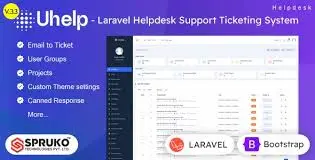
Uhelp – Helpdesk Support Ticketing System With Lifetime Update.
$10.90
| Features | Values |
|---|---|
| Version | v3.0.0 |
| Last Update | 18 December 2023 |
| Premium Features | Yes |
| Instant Installation Support | 24 Hrs. |
| Scanned By Virus Total | ✅ |
| Live Preview | 100% Working |
Introducing UHelp, the ultimate customer support management solution powered by Laravel. UHelp streamlines the process of tracking customer requests and resolving issues efficiently, based on factors like issue type, priority, and category. This system ensures prompt service delivery to customers while maintaining a comprehensive record of their requests.
Key Features:
1. **Efficient Issue Tracking**: UHelp enables seamless tracking of customer requests, ensuring timely resolution based on priority and category.
2. **Quick Service Delivery**: Customers can expect swift assistance through UHelp, minimizing downtime and enhancing satisfaction.
3. **Unified Support Experience**: With UHelp Support Desk, you can provide a consistent and uniform support experience across all customer interactions.
UHelp empowers businesses to deliver exceptional customer support, leading to increased satisfaction and loyalty.
Advanced Features of the Uhelp Application
• Holidays list synced with business hours.
• Added Google & Email Two-factor authentication to all logins.
• Added reply read receipts to admin panel users
• Roles Management
• Envato Support System
• Custom Fields
• Business Hours
• Live Notifications
• Announcements
• Agent name Privacy
• Ticket/Replies Restriction
• Trashed Tickets
• Ticket History/Timeline
• Knowledge Base
• Employee Groups
• Single/Multiple Assign
• Self asssign
• Email-To-Ticket
• Projects Management
• Enhanced Security
• Login as Customer
• Custom CSS & JS
• External Chat
• Captcha Security
• Customer’s Import
• Employee’s Import
• Project’s Import
• Multiple Delete
• Admin/Employee Note
• Google Analytics
• Customer IP Address
• Force SSL
• SEO
• Social Logins
• Envato Login
• Gmail Login
• Facebook Login
• Twitter Login
• File Uploads management
• Automation Functions
• Custom Notifications
• Custom Announcement
• Articles
• Ticket to Article
• Email Templates
• LTR to RTL
• Custom Pages
• Under maintenance
• User Rating’s
• Report’s
• Departments
• Auto Reload
• Infinity Scrolling
🌟100% Genuine Guarantee And Malware Free Code.
⚡Note: Please Avoid Nulled And GPL PHP Scripts.
Only logged in customers who have purchased this product may leave a review.











Reviews
There are no reviews yet.