


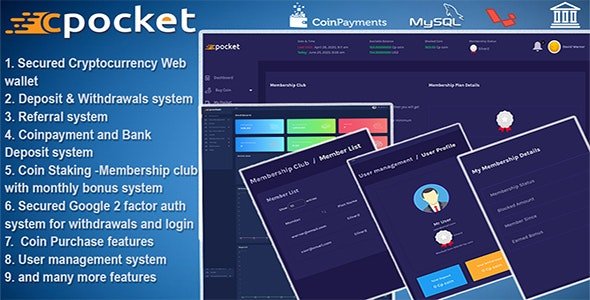
Cpocket – Best Cryptocurrency Web Wallet – Crypto Wallet With Lifetime Update.
$49.00
| Features | Values |
|---|---|
| Version | v 2.5 |
| Last Update | 9 May 2023 |
| Premium Features | Yes |
| Instant Installation Support | 24 Hrs. |
| Scanned By Virus Total | ✅ |
| Live Preview | 100% Working |
12
Items sold in last 3 minutes
230
People watching this product now!
Description
CPocket is a secure cryptocurrency wallet built on the Laravel framework and MySQL. Integrated with the coinpayment gateway, it supports various cryptocurrencies.
Features include buying coins via bank deposit or coin payment gateway, deposit and withdrawal functionalities, referral and membership systems, blocked coin management, and bonuses.
It offers coin staking and a membership club with configurable reward bonuses, making it an ideal platform for creating your own currency wallet.
Key Features
Admin Side
- Fully responsive and dynamic dashboard
- Easy to signup & signin
- Email verification
- Forgot password
- Profile management
- Initial coin offering System;
- Password setup
- Security management
- Complete user management
- Coin management
- Payment Method
- Sell coin report
- User coin order list
- Broadcast Email
- Bank management
- Deposit management
- Withdrawal management
- Accept withdrawal and buy coin system
- User id verification
- Manage referral system
- Admin settings
- Coin Payment setting
- Sms setting using twillo
- Fees setting
- FAQ Management
🌟100% Genuine Guarantee And Malware Free Code.
⚡Note: Please Avoid Nulled And GPL PHP Scripts.
Reviews (0)
Only logged in customers who have purchased this product may leave a review.
Installation Process


Certification








Reviews
There are no reviews yet.